Streamlit: The Go-To Framework for Data-Driven Applications

Introduction
Building interactive web applications has traditionally been a challenge, requiring expertise in front-end and back-end technologies. Enter Streamlit, a Python-based framework that simplifies the process of creating interactive data applications. Whether you're a data scientist, analyst, or developer, Streamlit empowers you to build beautiful, functional apps in minutes with minimal coding.
In this blog, we’ll explore what Streamlit is, its key features, and how it stands out as a go-to tool for data-driven applications.
What is Streamlit?
Streamlit is an open-source Python library designed to create web apps directly from Python scripts. It’s particularly popular among data enthusiasts for its ease of use and seamless integration with popular Python libraries like Pandas, NumPy, and Matplotlib.
Here’s what makes Streamlit unique:
- No front-end or back-end experience is needed.
- Automatically refreshes with every script update.
- Perfect for data visualization, ML model deployment, and dashboards.
Why Use Streamlit?
Quick Prototyping
You can transform static data into interactive applications with just a few lines of code.Seamless Integration
Works with Python libraries like NumPy, Pandas, Matplotlib, Plotly, and more.User-Friendly Widgets
Streamlit offers built-in widgets like sliders, text inputs, and dropdowns to make your app interactive.Live Updates
Streamlit automatically reruns the script whenever you make changes, ensuring an instant preview.
Streamlit Architecture Overview
Here’s a simple flowchart that demonstrates the architecture:
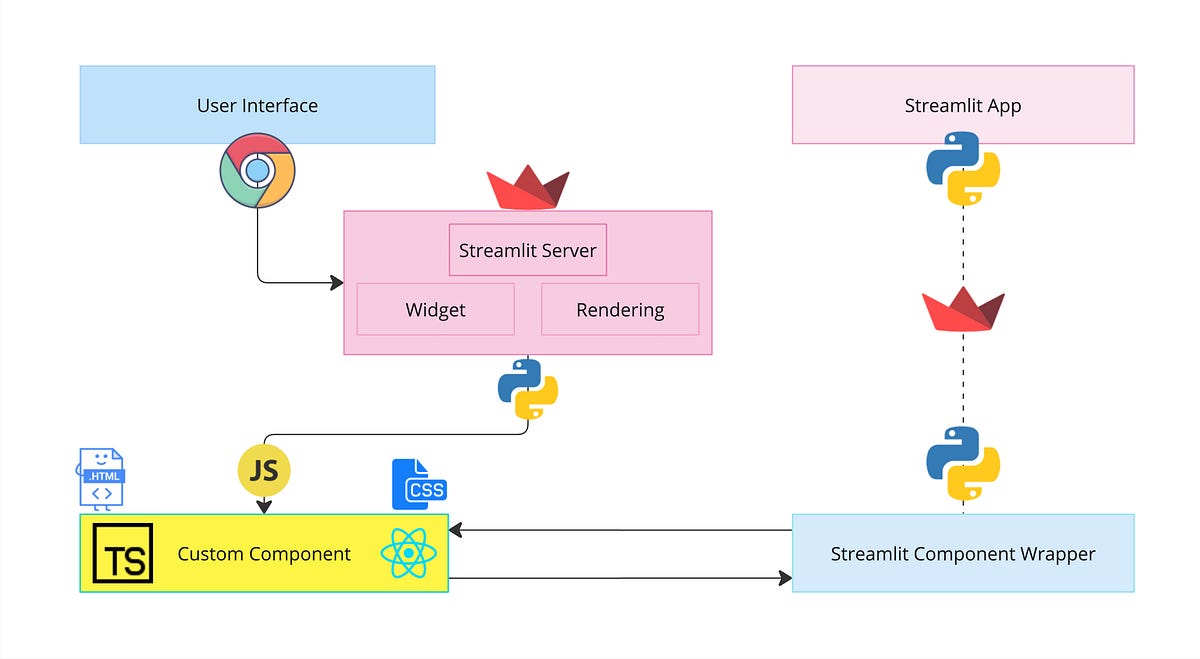
Python Script
Your Streamlit app starts as a Python script where you define the UI and logic.Streamlit Renderer
The framework converts the script into an interactive app by rendering widgets, charts, and layouts.User Interaction
The app captures user inputs (e.g., sliders, dropdowns) and sends them to the script.App Refresh
The app dynamically updates based on the new inputs, providing instant feedback to the user.
Core Features of Streamlit
- Interactive Widgets: Add sliders, checkboxes, and more with a single line of code.
- Dynamic Visualizations: Integrate Matplotlib, Seaborn, Plotly, and Altair for stunning visuals.
- Real-Time Feedback: Automatically rerun the app with every script change.
- Scalable Applications: Deploy easily using services like Streamlit Cloud, AWS, or Heroku.
Example Use Case: Customer Churn Dashboard
Let’s imagine you’re a data scientist working for a telecom company. You’re tasked with building a dashboard to analyze and visualize customer churn. Here’s how Streamlit can help:
- Input Filters: Add widgets for filtering data by customer demographics, regions, or subscription plans.
- Dynamic Charts: Use Seaborn or Plotly to display churn trends over time or across customer segments.
- ML Predictions: Integrate a machine learning model to predict churn probability for individual customers.
This is a practical scenario where Streamlit’s simplicity and power shine, enabling you to deploy the dashboard in hours instead of weeks.
How to Get Started with Streamlit
Installation
Hello World
Create a file calledapp.pyand add the following code:Run Your App
Open the local URL in your browser to see your app in action.
Why Streamlit Over Alternatives?
| Feature | Streamlit | Dash | Flask | Django |
|---|---|---|---|---|
| Ease of Use | ⭐⭐⭐⭐⭐ | ⭐⭐⭐ | ⭐⭐ | ⭐⭐ |
| Deployment Speed | ⭐⭐⭐⭐⭐ | ⭐⭐⭐⭐ | ⭐⭐⭐ | ⭐⭐ |
| Interactivity | ⭐⭐⭐⭐⭐ | ⭐⭐⭐⭐ | ⭐⭐⭐ | ⭐⭐ |
| Best For | Data Apps | Data Dashboards | Web Backends | Full Web Apps |
Conclusion
Streamlit is a game-changer for anyone looking to build data applications without delving into complex web development. It’s intuitive, powerful, and versatile, making it a must-try tool for data scientists, analysts, and engineers .
Ready to build your first app? Head over to the Streamlit documentation to get started today!


Comments
Post a Comment